ARCANA MU ONLINE · THE CONTINENT OF LEGEND
Get the client

THE CONTINENT OF LEGEND

Your world. Your legend.

Start Your Journey
Classic ItemsBattlewars

Improved gameplay and activities

CHOOSE YOUR WORLD

Server Information

Compare the realms and find the progression that suits you.

Season 2

Battlewars

Current realm
Equipment
Classic Items
Experience
x20
Drop rate
45
Reset limit
10 resets
Maximum level
400
Explore this realm →
Season 2

Hardcore

Arcana Network
Equipment
Classic Items
Experience
x1
Drop rate
10
Reset limit
No Reset
Maximum level
400
Select realm →
97D

Nostalgia

Arcana Network
Equipment
Classic Items
Experience
x20
Drop rate
75
Reset limit
15 resets
Maximum level
350
Select realm →
BATTLEWARS PROGRESSION

Grand Reset

A fresh progression cycle without an increase in character power.

Resets after Grand Reset
0
Level after Grand Reset
1
Base stats
25 / 25 / 25 / 25
Stat & power bonus
No bonus stats or power boost

RewardOne item of your choice, +13 with 2 options. Permanently bound to the player.

Each realm has its own rates, level cap and reset rules.

Few hours offline during Maintenance v16.1

Few hours offline during Maintenance v16.1

Posted: 11 / 06 / 2025 By: dopeboyone

Update is starting right now, the server will remain offline for couple of hours - depends on the time we will finish.

In order to start playing again, newer client will be needed to download ( v16.1 ).

See you soon :)
 

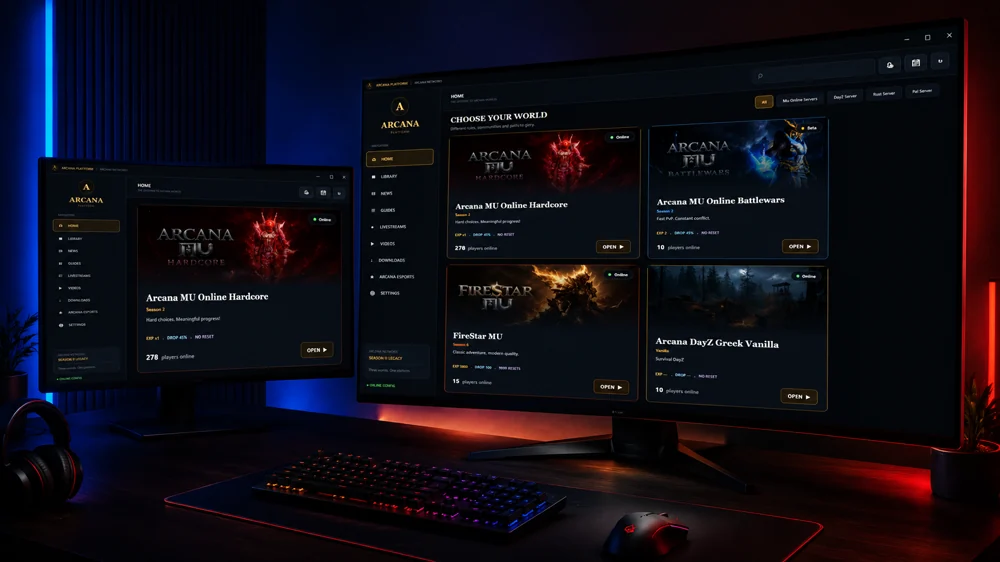
THE ULTIMATE GAME LAUNCHER

Arcana Platform

Install, update and play every realm from one place. Fast downloads, one-click patching and multi-server support.

  • One-click
    install
  • Auto
    updates
  • Multi-server
    support
Arcana Platform launcher shown on a desktop and laptop

Begin Your Journey

Download Arcana

The easiest way to install
and update all servers.

Installation help & downloads →
Arcana Services
Arcana Services
MU Online Hub
MU Online Hub
MSPro
MSPro
PSDevs
PSDevs
SoftwareRG
SoftwareRG
INSTALL · UPDATE · PLAY

Arcana Platform 18.6.1

Windows installer · 55.3 MiB

Google Drive

Download
Arcana Platform

Installer or .rar archive

MEGA

Download
Arcana Platform

Installer or .rar archive

Arcana

Download
Arcana Platform

Installer or .rar archive

Arcana · .exe

The percentage measures the file received by this page. After transfer, your browser handles saving it. You can check the saved file in Downloads.

Installation guide

Download only from Arcana's official website and check the filename before opening it. This release is not digitally signed.

Microsoft Edge: “isn't commonly downloaded”

The screenshots below apply only to this uncommon-download message, when you intentionally downloaded the official Arcana installer. If the message reports malware or a different threat, stop and contact support.

  1. Open Downloads

    Open the Downloads panel in the top-right corner of Edge and locate Arcana Platform 18.6.1.exe.

    Open Downloads in Microsoft Edge
  2. More actions

    Select the three-dot menu next to this file.

    More actions in Microsoft Edge
  3. Keep

    Choose Keep for this download.

    Keep in Microsoft Edge
  4. Confirm your choice

    In the confirmation panel, open the arrow next to Delete and choose Keep anyway.

    Confirm your choice in Microsoft Edge
  5. Open file

    After saving, choose Open file and follow the installer setup.

    Open file in Microsoft Edge

Menu wording can vary by browser version. These steps do not require changing your browser's protection settings.

Select Server

Choose your realm.

BattlewarsSeason 2HardcoreSeason 2Nostalgia97D

Account

Forgot your password? · Register

Select Server:
Loading...