ARCANA MU ONLINE · THE CONTINENT OF LEGEND
Get the client

THE CONTINENT OF LEGEND

Your world. Your legend.

Start Your Journey
Classic ItemsBattlewars

Improved gameplay and activities

CHOOSE YOUR WORLD

Server Information

Compare the realms and find the progression that suits you.

Season 2

Battlewars

Current realm
Equipment
Classic Items
Experience
x20
Drop rate
45
Reset limit
10 resets
Maximum level
400
Explore this realm →
Season 2

Hardcore

Arcana Network
Equipment
Classic Items
Experience
x1
Drop rate
10
Reset limit
No Reset
Maximum level
400
Select realm →
97D

Nostalgia

Arcana Network
Equipment
Classic Items
Experience
x20
Drop rate
75
Reset limit
15 resets
Maximum level
350
Select realm →
BATTLEWARS PROGRESSION

Grand Reset

A fresh progression cycle without an increase in character power.

Resets after Grand Reset
0
Level after Grand Reset
1
Base stats
25 / 25 / 25 / 25
Stat & power bonus
No bonus stats or power boost

RewardOne item of your choice, +13 with 2 options. Permanently bound to the player.

Each realm has its own rates, level cap and reset rules.

Weekly Special Event

WEEKLY SPOTLIGHTBattlewars

Weekly schedule

Weekly event details are not available for this realm yet.

Explore the events available for your realm.View event guide →

Weekly spotlight schedule · Rewards and server bonuses are announced separately.

News & Updates

Arcana Mu Online Season 2 - 2.0 - Update v17.1.1

 a late 1-year anniversary update
 

  •  Download new Client or better Arcana Platform From Website/Downloads
  • or from this link
    Arcana Platform is a gaming platfrom by Arcana, is a new program and you need to approve it while downloading it.

Read our latest updates on discord

Read more →

Mu Hardcore 1 Year Anniversary

🎉 1 Year Anniversary Event 🎉

📅 Event Period: May 31, 2026 → August 1, 2026
 

⚡ Speed Server Boost

  • x2.5 EXP instead of x2

  • Available for Levels 1–320

  • Includes 20 bonus levels for our 1 Year Anniversary

  • Event applies to both new and existing players


🎁 Welcome Back Rewards

New Players

  • Claim 7 Days of Free VIP

Returning Players

  • Claim 14 Days of Free VIP

🎁 Guild & Friends Transfer Rewards

Invite your friends or bring your entire guild to the server and receive:

🎖 21 Days of VIP Rewards

How it works:

  • Transfer with friends or guild members
  • Stay active together on the server
  • Rewards are given to eligible transferred players

This system is designed to help communities grow together and enjoy the anniversary event as a team.

📩 Contact us on Discord for transfer verification and reward activation.


🌐 Website Rewards

  • Earn special rewards every 10 levels

  • The higher your level, the better the rewards


 Daily Pets

Receive daily:

  •  Panda Pet

  •  Skeleton Pet

Duration: 6 Hours

These pets provide:

  • +28% EXP boost based on the default dynamic EXP system

  • Higher-level players receive slightly lower bonus EXP for balance


💎 Fair Play Philosophy

Nothing here is Pay2Win.
Many features are designed to be Play2Earn instead.


🆕 New Content

Nightmare Boss

The first real boss has arrived.
Prepare your team and enter the nightmare!

Read more →

Arcana Mu Online Original TG2

Shorter Version (English):
Oldschool classic is back online!

No monsters until 28/02/2026 16:00 (GMT+2).
Join us for the next 30 hours before monsters go live!


Greek (Ελληνικά):
Ο Oldschool classic επέστρεψε online!

Χωρίς τέρατα μέχρι 28/02/2026 16:00 (GMT+2).
Ελάτε μαζί μας για τις επόμενες 30 ώρες πριν ενεργοποιηθούν τα τέρατα!


Brazil (Português – Brasil):
Oldschool classic está de volta online!

Sem monstros até 28/02/2026 às 16:00 (GMT+2).
Junte-se a nós nas próximas 30 horas antes dos monstros serem ativados!


Turkey (Türkçe):
Oldschool classic tekrar online!

28/02/2026 16:00 (GMT+2)'ye kadar canavar yok.
Canavarlar aktif olmadan önceki 30 saat için bize katılın!
Read more →

Arcana Mu Season 2 Collaboration with StobePlay

StobePlay - Hardcore Thank You

Hardcore – Thank you message

🇬🇧 English

Hi StobePlay!
Thank you so much for the Hardcore video! It was amazing — you can really see the effort and passion you put into it. We loved your energy, your style, and the way you play. We’re very happy and grateful that you made this video. Keep up the great work, you’re awesome!

🇧🇷 Português (Brasil)

Oi StobePlay!
Muito obrigado pelo vídeo de Hardcore! Ficou incrível — dá pra ver o esforço e a paixão em cada detalhe. A gente adorou sua energia, seu estilo e a forma como você joga. Ficamos muito felizes e gratos por você ter feito esse vídeo. Continue assim, você é demais!

Read more →
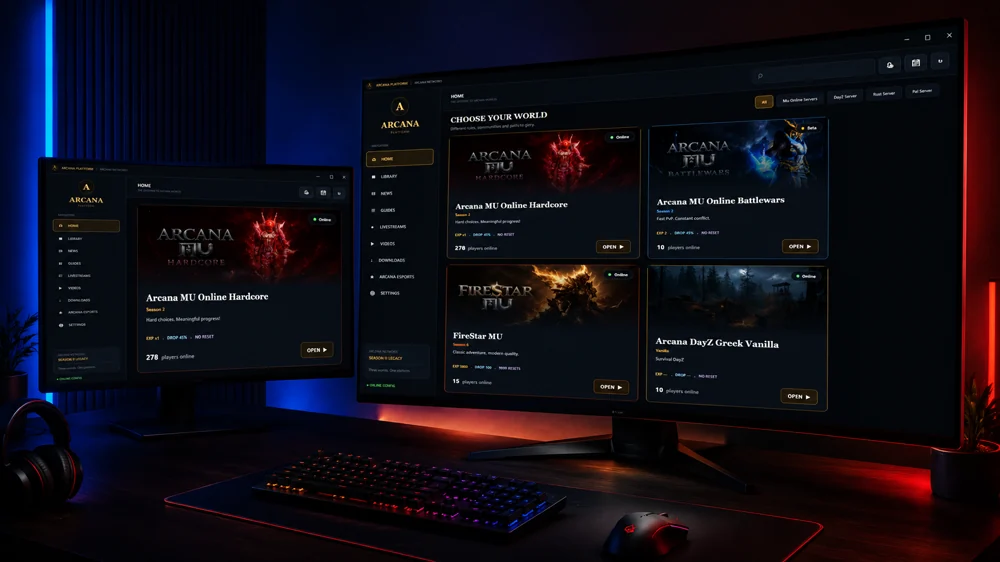
THE ULTIMATE GAME LAUNCHER

Arcana Platform

Install, update and play every realm from one place. Fast downloads, one-click patching and multi-server support.

  • One-click
    install
  • Auto
    updates
  • Multi-server
    support
Arcana Platform launcher shown on a desktop and laptop

Begin Your Journey

Download Arcana

The easiest way to install
and update all servers.

Installation help & downloads →
Arcana Services
Arcana Services
MU Online Hub
MU Online Hub
MSPro
MSPro
PSDevs
PSDevs
SoftwareRG
SoftwareRG
INSTALL · UPDATE · PLAY

Arcana Platform 18.6.1

Windows installer · 55.3 MiB

Google Drive

Download
Arcana Platform

Installer or .rar archive

MEGA

Download
Arcana Platform

Installer or .rar archive

Arcana

Download
Arcana Platform

Installer or .rar archive

Arcana · .exe

The percentage measures the file received by this page. After transfer, your browser handles saving it. You can check the saved file in Downloads.

Installation guide

Download only from Arcana's official website and check the filename before opening it. This release is not digitally signed.

Microsoft Edge: “isn't commonly downloaded”

The screenshots below apply only to this uncommon-download message, when you intentionally downloaded the official Arcana installer. If the message reports malware or a different threat, stop and contact support.

  1. Open Downloads

    Open the Downloads panel in the top-right corner of Edge and locate Arcana Platform 18.6.1.exe.

    Open Downloads in Microsoft Edge
  2. More actions

    Select the three-dot menu next to this file.

    More actions in Microsoft Edge
  3. Keep

    Choose Keep for this download.

    Keep in Microsoft Edge
  4. Confirm your choice

    In the confirmation panel, open the arrow next to Delete and choose Keep anyway.

    Confirm your choice in Microsoft Edge
  5. Open file

    After saving, choose Open file and follow the installer setup.

    Open file in Microsoft Edge

Menu wording can vary by browser version. These steps do not require changing your browser's protection settings.

Select Server

Choose your realm.

BattlewarsSeason 2HardcoreSeason 2Nostalgia97D

Account

Forgot your password? · Register

Select Server:
Loading...